One workspace for the pass, the floor, and the books.
Menu, POS, kitchen, tables, reservations, inventory, staff, billing, and reporting—scoped per organization and location so every team sees only what matters.
Looks like a real POS
Full-screen ordering, category filters, and a right-side checkout panel—built for speed on touch screens.
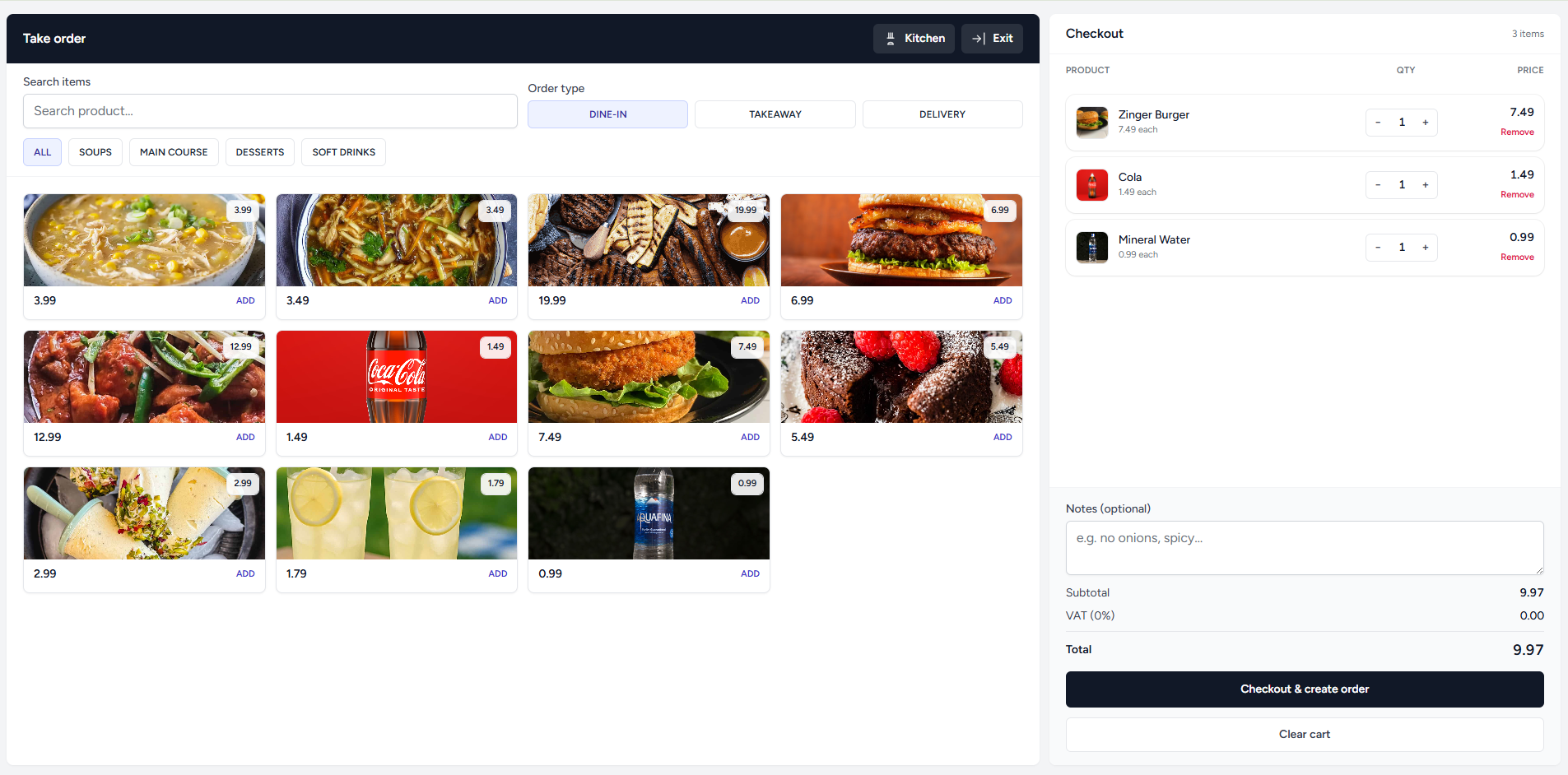
Tap a product tile to add \(+1\). Quantities update instantly.
Right-side receipt keeps totals visible and reduces mistakes.
Kitchen queue and order statuses keep FOH/BOH in sync.
Designed for clarity at every station
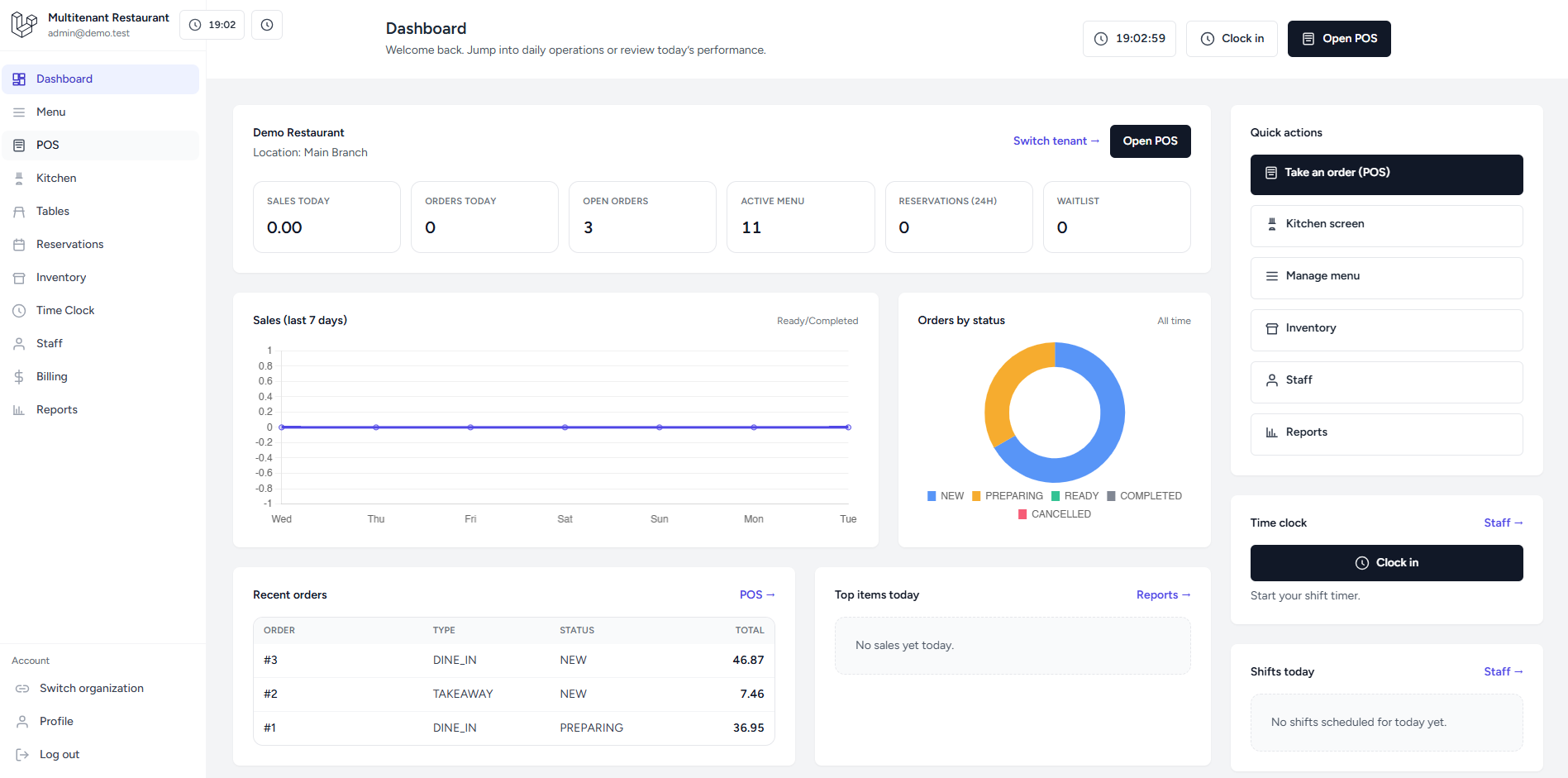
Your front-of-house and back-of-house stay in sync, with tenant-safe data and role-based access.
Everything you need to operate daily
From menu setup to staff time tracking—built as consistent modules so your team learns it once.
Pricing
Plans that grow with every location
Transparent per-month pricing. Add locations when you are ready—no surprise module locks. Card billing via Stripe is wired in Cashier; connect your keys when you go live.
Starter
Single venue, full core stack.
Billed monthly · cancel anytime
- 1 active location
- Menu, categories & items
- POS checkout & receipts
- Kitchen board & order status
- Tables & reservations
- Email support
Growth
Small groups & busy service windows.
Up to 3 locations included · then add-ons
- Everything in Starter
- Up to 3 locations
- Inventory & stock movements
- Reservations + waitlist
- Staff, shifts & time clock
- Billing (Cashier) & reports
- Priority email support
Enterprise
Franchise, SLA, or custom workflows.
Volume pricing · annual contracts · onboarding
- Unlimited locations
- Advanced roles & audit needs
- Custom reporting & exports
- Dedicated success manager
- Optional white-label & SSO roadmap
Taxes where applicable. Final checkout flows are completed in your Stripe Dashboard.
Questions
Frequently asked questions
Straight answers about tenancy, day-to-day operations, and how billing fits in. Open any item for details—no extra scripts required.
Is the product multi-tenant?
Yes. Users belong to accounts, each account can run multiple organizations (brands or companies), and each organization can have multiple locations. POS, kitchen, inventory, staff, and reports are always scoped to the organization and location you have selected, so data never leaks across tenants.
How do POS orders reach the kitchen?
Checkout creates orders with line items; those orders appear on the kitchen board with statuses your team can advance as food is prepared and served. The flow is intentionally simple so a busy service period stays fast—no extra hardware assumptions beyond a browser.
Does inventory tie into what we sell?
You can attach recipes to menu items so each sale knows which ingredients to consume. Stock movements give you an audit trail (receipts, adjustments, waste, and sales-driven deductions). It is a practical baseline for counting stock without turning the POS into a full warehouse WMS on day one.
How does Stripe billing work here?
Laravel Cashier is wired in with migrations in place. You bring your own Stripe keys, map products or prices to plans, and customers can self-serve through Stripe Checkout or the Customer Billing Portal for upgrades, payment methods, and invoices. Until keys are connected, billing screens act as a clear checklist—not a black box.
Who owns our data? Can we export it?
Your operational data lives in your database under your hosting. The application is structured so you can add reporting exports or APIs where you need them. For compliance conversations (retention, backups, DPA), Enterprise is the right tier to align expectations with your legal team.
Can we adapt the UI and workflows?
The front end uses Tailwind with consistent Blade components, so iterating on layout and copy is fast. Domain rules live in Laravel where they belong—policies, jobs, and events—so you can extend modules (for example, custom reports or approval steps) without fighting the framework.
Get started
Ready to run the floor and the back office in one place?
Create an account, create your first organization, add a location, and invite staff when you are ready. You can explore core flows in minutes.